See what your smart meter knows.
The P1MeterKit plugs into the P1 port of your smart meter. You see your electricity use, solar export and gas in Home Assistant, in the SmartHomeShop app, or in both.

Will it fit your meter?
Three quick checks before you order.
- Your meter
- A DSMR 4 or 5 or ESMR 5 smart meter with a P1 port. The type is on the label of the meter. An RJ12 socket alone is no guarantee, so have older meters checked first. In Belgium, the user port of a digital meter may first need to be activated by your grid operator.
- Power
- Most DSMR 5 meters power the kit through the P1 port. For a DSMR 4 meter, or a meter that supplies too little power, use USB-C. You can add a USB-C power set when you order.
- Network
- The kit connects over 2.4 GHz WiFi or, with the Thread firmware, over Thread. Weak WiFi at the meter? The WaterP1MeterKit also connects by Ethernet, with PoE.
Not sure about your meter? Send us a photo of the label and we will check it. Ask us
Your energy in the SmartHomeShop app
No Home Assistant? Use the P1MeterKit with our app in a browser on your phone, tablet or computer, at home or away. With cloud firmware you see what you use, what you export and what it costs.
Sample data
Now from the grid Now to the grid
1.684 W
Gas today
1,10 m³
Costs today
€ 1,63
Last 3 hours · new reading every 10 seconds
Today so far
- From the grid
- 5,20 kWh
- To the grid
- 4,05 kWh
- Gas
- 1,10 m³
- Costs
- € 1,63
Phase load
· ·
Off-peak and standard tariff
- Off-peak
- Standard
Standby usage
Good54 W
≈ € 127,72 per year
Measured between 00:00 and 06:00
Costs with a sample energy contract
Sample data
Live Graphs
September 2026- Grid import
- 254.0 kWh
- Return
- 180.2 kWh
- Highest voltage
- 247.3 V L2
- Highest current
- 21.4 A
Voltage
236.4 V
Estimated quarter hour peak
3.42 kW
Estimated from usage
Total electricity consumption
Compare your total electricity consumption
September 2026 · Days with measurements: 30
Your actual grid consumption (T1 + T2) for the days with measurements in this range, compared with CBS annual household references scaled to the same number of days.
Your home 254.0 kWh
-
Lower-use home
128.2 kWh
1,560 kWh annual reference
-
Average home
205.5 kWh
2,500 kWh annual reference
-
Higher-use home
284.4 kWh
3,460 kWh annual reference
Closest to you
Sample data
Dynamic prices
Hourly electricity price
Now €0.205 / kWh
Gas today €1.208 / m³
Including energy tax and VAT · pick a bar
Find the cheapest run of hours
- Lowest
- 20ct/kWh
- Average
- 26ct/kWh
- Highest
- 35ct/kWh
Tomorrow’s prices are published around 15:00.
Comparison
What would dynamic have cost you?
Based on your real smart meter data we calculate what each dynamic supplier would have cost you over this period, compared with your current tariffs.
- Period
- 17 Sep to 16 Oct
- Usage
- 241.6 kWh · 46.85 m³
- Your actual costs
- €140.83
- You would save
- €16.46
- EnergyZero (Cheapest) Dynamic Electricity €62.14 · Gas €57.35 €124.37 -€16.46
- Zonneplan Dynamic Electricity €63.17 · Gas €57.35 €125.44 -€15.39
- NextEnergy Dynamic Electricity €63.17 · Gas €57.63 €125.73 -€15.10
- Tibber Dynamic Electricity €62.58 · Gas €57.58 €126.06 -€14.77
- Average regular contract (CBS, June 2026) Fixed/variable Electricity €60.53 · Gas €61.47 €138.91 -€1.92
Full contract analysis
A yearly projection, whether dynamic suits you and what shifting your usage adds, with a PDF report.
Your analysis is ready PDF report
- Yearly projection
- €200 per year
- Does dynamic suit you?
- Neutral profile
- Extra savings by shifting
- €25 per year
Sample data
Tools
Calculate with your own measurement data and get a realistic estimate for your home.
Energy
Calculate your energy investment
Home battery
Charging from solar
38%3.78 / 9.94 kWh
Last calculated hour: today 13:00 · Own solar first
- Saved today
- €0.49
- Grid import avoided
- 2.78 kWh
- Charged today
- 2.92 kWh
- Discharged today
- 2.78 kWh
Virtual behaviour over the last 7 days
A virtual battery: calculated on your own P1 readings, nothing is controlled.
Your selected battery · 10 kWh
€165savings per year
- Payback period
- More than 30 years
- Less grid import
- 27.7%
- Cycles per year
- 186
Best fitting size
5 kWh
Based on the highest net return over fifteen years, with wear calculated from actual simulated battery cycles.
Estimated household profile366 daysIndicative profile
Which battery fits best?
15 years · cycle-based degradation
| Battery | Guide price | Saves per year | Payback period | Net after 15 years |
|---|---|---|---|---|
| 5 kWh Best choice | €4,000 | €142 | 28.1 years | -€2,021 |
| 10 kWh | €6,000 | €165 | More than 30 years | -€3,635 |
| 15 kWh | €8,000 | €174 | More than 30 years | -€5,460 |
| 20 kWh | €11,000 | €177 | More than 30 years | -€8,402 |
Solar panelsSolar panels + home battery
Your selected system
10 panels× 435 Wp · 4.35 kWp
- Annual production
- 4,029 kWh
- Savings from 2027
- €320€485
- Payback period
- 15.2 years21.6 years
- Used directly or from storage
- 27.3%54.2%
Best fitting number
16 panels
6.96 kWp
PVGIS location modelIndicative profile
Before and after net metering
- 2026 with net metering
- €794
- From 2027
- €320€485
- Additional battery value
- €0€165
Solar forecast
Up to dateExpected now
2.32kW
- Today
- 11.47 kWh
- Remaining today
- 4.35 kWh
- Tomorrow
- 7.93 kWh
- Peak today
- 2.41 kW · 13:30
- Next hour
- 1.81 kW
With your own Forecast.Solar key.
Sample data
Alerts
-
High power
> 3 kW
Last triggered: 2 days ago
-
Low grid voltageLow voltage
< 215 V
Not triggered yet
-
Device offline
> 5 min
Not triggered yet
Recent activity
High power: 3.42 kW (> 3.00 kW)
High power: 3.18 kW (> 3.00 kW)
What the email looks like
SmartHomeShop.ioHigh power - Meter cupboard
High power
An alert was triggered on your device Meter cupboard.
Measured value: 3.42 kW
Threshold: > 3.00 kW
Quick presets
- High power> 3 kW
- Low grid voltage< 215 V
- High gas usage> 5 m³
- Device offline> 5 min
Send via
- Push notifications
- Power now and per phase, from and to the grid
- Hourly, daily, monthly and yearly charts for electricity and gas
- Costs based on your own energy contract
- Standby usage, measured at night
- Solar panel and home battery calculators on your own readings
- Free account: dashboard, live data and 12 months of history
- Live energy flow from and to the grid, with gas
- Voltage and current per phase, with the limits of the standard (207 and 253 volts)
- Quarter-hour peak, standby use and voltage dips
- Your usage next to that of an average household
- Trends per hour of the day, and days, months or years side by side
- Your own contract: fixed, variable or dynamic
- Dynamic with 8 Dutch suppliers, with energy tax and VAT added automatically
- The hourly electricity price for today and tomorrow
- What would dynamic have cost you? Calculated on your own meter data
- Full contract analysis with a PDF report
- Solar panels: yield for your roof, payback time and the end of net metering in the Netherlands
- Home battery: buying advice for four sizes on real hourly prices
- Solar panels and a home battery calculated together
- Live virtual battery: what a battery would save you right now
- Solar forecast for your own panels, with your own Forecast.Solar key
- On high usage or a lot of return delivery
- On voltage that is too high or too low
- When your meter goes offline
- Free: 1 alert per device. Plus gives you 20, Pro unlimited.
Home Assistant, our app or both
Use P1MeterKit with Home Assistant, the SmartHomeShop cloud app or both at the same time. With compatible firmware, you can combine local dashboards and automations with remote access to your readings in our app.

Locally with Home Assistant
With local ESPHome firmware, readings go straight to Home Assistant. No SmartHomeShop account or cloud subscription is required.
- Electricity use, export and available gas readings in your Energy Dashboard.
- Build your own dashboards and automations using P1 readings.

Through the SmartHomeShop app
No Home Assistant needed. Open our cloud app in a browser on your phone, tablet or computer, even when you are away from home.
- View current power, electricity use, export and gas from your P1 meter.
- Compare energy use in hourly, daily, monthly and yearly charts.
- See energy costs based on your configured energy contract.
Cloud use requires an account, internet and cloud firmware that supports your model. Readings and features depend on hardware and firmware; history and usage limits depend on your app plan. With supported firmware, you can also use the app and Home Assistant together.
Find the right firmwareWhich kit do you need?
All three work with the P1 port of your smart meter. Pick what fits your home.
-
P1MeterKit
This pageElectricity, solar export and gas
€24.00 incl. 21% VAT
Buy the P1MeterKit -
WaterP1MeterKit
Also water and leak alerts, WiFi or Ethernet with PoE
€70.00 incl. 21% VAT
Compare with the P1MeterKit -

P1SplitterKit
P1 port already in use? Up to five devices on one port
€35.00 incl. 21% VAT
How the splitter works
Is your P1 port already in use?
Your meter has one P1 port. If a charging station, solar inverter or energy manager already uses it, the P1SplitterKit gives you five outputs, and every device reads the same meter at the same time.
- Five active outputs with their own amplifier, without data loss
- Powered by the meter or USB-C, use USB-C for several devices
- An LED per output shows data flowing
- No software and nothing to set up
- 1 m RJ12 cable included
Smart meter
P1
P1SplitterKit
- P1MeterKit
- Charging station
- Solar inverter
- Energy manager
- Free output
Made for the Home Assistant Energy Dashboard
Home Assistant finds the P1MeterKit on your network through ESPHome. Your electricity, solar export and gas go straight into the Energy Dashboard, and every reading is ready for your own automations. Your data stays in your own network.
- A new reading every second on DSMR 5 meters
- Electricity use and export per tariff, in kWh
- Power now and per phase, plus voltage and current
- Gas meter reading
- Power failures, voltage sags and swells
- Temperature and humidity at the meter
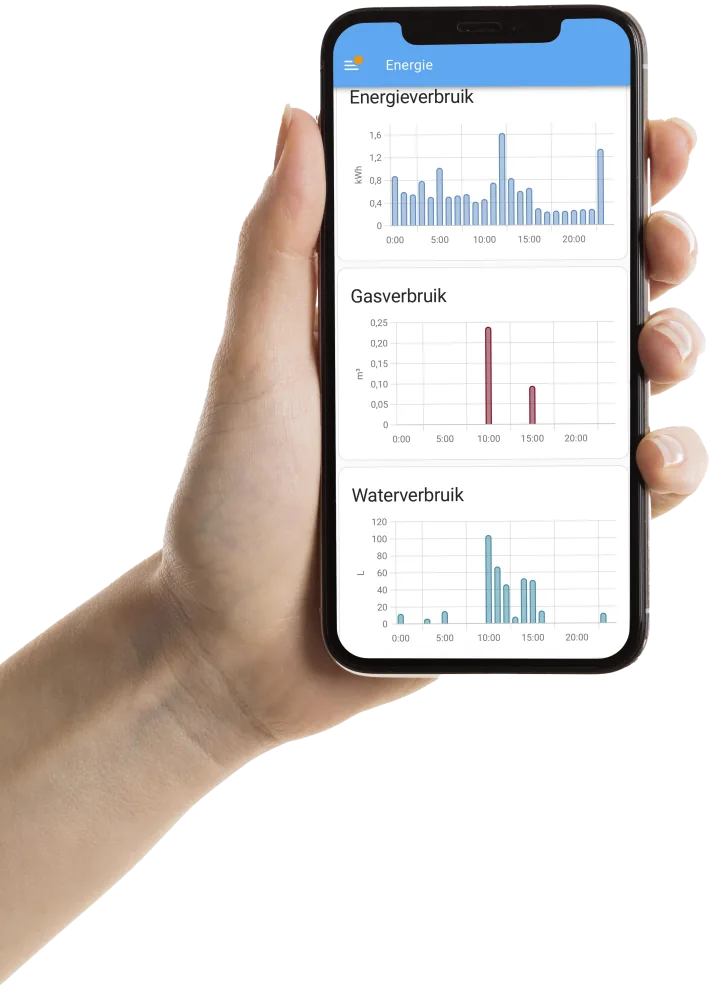
So much more with our Home Assistant integration
Install our free integration from HACS and Home Assistant gains a complete energy system: your contract prices, a planner for your home battery, smart solar control, the Smart Energy panel and dedicated cards.
Free and open source. In English, Dutch, German, French and Spanish.
With your free account and energy contract
Link your SmartHomeShop account to your contract and Home Assistant starts acting on price. Dynamic prices are available for Dutch suppliers; Smart Energy is new and still growing.
- Your contract prices in Home Assistant
- Fixed, variable or dynamic. With a dynamic contract you see the prices per hour or quarter-hour for today and, as soon as they are published, for tomorrow.
- Charge and discharge your home battery smartly
- Every 5 minutes a planner works out when your battery should charge, hold or discharge, using your prices, the solar forecast, your usage and battery wear. By default you get advice. Turn on automatic control and Home Assistant runs your battery through the integration of your battery or inverter.
- Devices in the cheapest hours
- Say the car must be ready at 07:00 and needs 4 hours of charging: Home Assistant picks the cheapest hours before then and can guard your main fuse. Also for a dishwasher in one block, or pre-heating with your heat pump when electricity is cheap.
- Solar panels at negative prices
- Limit your return delivery as soon as the feed-in price drops below zero, or use that electricity yourself.
- Know when electricity is cheap
- Sensors for the current price, the price level and the cheapest block of 1 to 6 hours, ready for your own automations.
- See what it earns you
- How much your smart control saves per day and per month with your battery and scheduled devices, compared with that day's average price.
Instant, local and without an account
This works right after installing, entirely on your own network.
- Make use of your solar surplus
- Switch on a device, water heater or heat pump when you produce more than you use, or keep your return delivery close to zero with your inverter's power limit.
- Dedicated dashboard cards
- A P1MeterKit card with power from and to the grid, the load per phase, your costs today and this month, standby use and your monthly peak. Plus cards for live energy, prices, usage and costs.
- The Smart Energy panel
- See at a glance what your home uses right now and where it comes from: the grid, your solar panels or your battery, with today's trend.
- Into the Energy Dashboard in one click
- Electricity, return delivery and gas go into the Home Assistant Energy Dashboard with the right prices. You review the changes first.
- An eye on your main fuse
- How heavily each phase is loaded compared with your main fuse, the imbalance between the phases and how much power you have left.
- Standby use and monthly peak
- Your lowest night-time use with its yearly cost, and your highest quarter-hour peak of the month, useful with the Belgian capacity tariff.
- Ready-made notifications
- High usage, more than 500 W at night, close to your fuse limit or a lot of return delivery: one click turns each into a regular Home Assistant automation, also as a push notification through the Home Assistant app.
Open source firmware with ESPHome
Full control over your P1MeterKit with open configuration, local data, and direct Home Assistant integration.
- Fully open source
- All firmware and configuration live on GitHub. You can adapt it directly to your own setup.
- Built on ESPHome
- Stable real-time data with OTA updates and native Home Assistant support.
- 100% Local
- With local firmware, your readings stay within your own network, with no mandatory cloud or subscription.
# P1MeterKit, ESPHome package
substitutions:
  name: p1meterkit-a1b2c3
  friendly_name: P1MeterKit a1b2c3

packages:
  smarthomeshop.p1meterkit:
    url: https://github.com/smarthomeshop/p1meterkit
    ref: main
    files: [p1meterkit-v3/p1meterkit.yaml]

esphome:
  name: ${name}
  friendly_name: ${friendly_name}

api:
wifi:
Customer Reviews
4,9
Based on reviews
Product rating distribution
- star reviews
 4.8 on Google · General business rating
Share your thoughts
If you've used this product, share your thoughts with other customers
Write a reviewThe 10 latest reviews
-
Google
Translated from Dutch Original (Dutch)
Frequently Asked Questions
Find answers to the most frequently asked questions about the P1MeterKit.
-
A small module that reads the P1 port of your smart meter. You see your electricity use, solar export and gas, and the kit also measures temperature and humidity at the meter. You use it with Home Assistant, with the SmartHomeShop app, or with both.
-
It works with DSMR 4 and 5 and ESMR 5 smart meters with a P1 port. You find the type on the label of your meter. An RJ12 socket alone is no guarantee, so have older meters checked first. Not sure? Send us a photo of the label and we will check it.
-
Plug the included 2 m RJ12 cable into the P1 port of your meter and into the kit. Most DSMR 5 meters power the kit. With a DSMR 4 meter, or too little power from the meter, use USB-C. Then connect the kit to your 2.4 GHz WiFi. Home Assistant finds it automatically, or you add it to the app with cloud firmware.
-
Yes. In Home Assistant you can build automations on every reading, for example a notification when you import more than 3 kW, or starting the dishwasher when your solar panels export power.
-
The WaterP1MeterKit does everything the P1MeterKit does and also reads your water meter, with leak alerts. It can also connect by Ethernet with PoE and has an expansion port. If you only want insight into electricity and gas, the P1MeterKit is enough.
-
Use the P1SplitterKit. It turns one P1 port into five active outputs, each with its own amplifier, so a charging station, inverter or energy manager and the P1MeterKit can read the meter at the same time.
-
The P1MeterKit and a 2 m RJ12 cable. A USB-C power set is optional when you order. You need it for a DSMR 4 meter or when your meter supplies too little power.
-
Yes. You see electricity use and solar export per tariff, power now and per phase, and the gas reading that your smart meter passes on.
-
DSMR 5 meters send a new reading every second, DSMR 4 meters every 10 seconds. Home Assistant receives every reading. Gas is updated as often as your meter reports it. In the SmartHomeShop app, a new reading arrives every 10 seconds.
-
Local use with ESPHome and Home Assistant requires no SmartHomeShop subscription. The optional cloud app has its own plans; history, features and usage limits depend on the plan you choose.
-
You choose. With local ESPHome firmware, readings stay within your network and you use Home Assistant. Supported cloud firmware lets you use the SmartHomeShop app without Home Assistant, with an account and internet. Features and history depend on model, firmware and app plan.
-
Yes, with firmware that supports both. Home Assistant then gets the readings locally, and the app shows them wherever you are. The app needs a SmartHomeShop account and internet.
-
Yes. The P1MeterKit has a built-in Thread radio. With the Thread firmware it talks to Home Assistant locally through your Thread border router, without WiFi. Over Thread a reading arrives every 5 seconds, so your Thread network doesn't get flooded. If you use the SmartHomeShop app, choose the WiFi firmware.
Still have questions? Get in touch with us
Contact UsTechnical Specifications
- Connection to Energy Meter
RJ12 port for direct coupling with DSMR-compatible energy meters
- Network Connection
- Wi-Fi IEEE 802.11 b/g/n (2.4 GHz), supports WPA2/WPA3 security.
- Thread via the built-in IEEE 802.15.4 radio, with the Thread firmware and a Thread border router.
- Data Transfer
Every second on DSMR 5 meters, every 10 seconds on DSMR 4. Over Thread every 5 seconds.
- Physical Dimensions of the Kit
92 x 47.5 x 26.5 mm
- Cable Length
2-meter RJ12 cable for connection to the energy meter
- Power Supply
USB-C port for power supply (5V, 1A) with included USB adapter (if chosen). Alternative power supply possible via the energy meter with DSMR v5.0 that supports power supply through the RJ12 port
- Operational Classification
IP20 (suitable for indoor use)
- Temperature Range
Operational from -10 °C to +40 °C
- Compatibility
Works with DSMR versions 4.0 and 5.0, as well as ESMR 5.0
- Software
Fully integrated with Home Assistant, support for over-the-air firmware updates (OTA)
Choose your meter kit.
Water only, energy only or both: there is always a kit that fits your meters.
|
Water |
WaterP1 |
P1 |
|
|---|---|---|---|
| Home Assistant | Yes | Yes | Yes |
| SmartHomeShop app | Yes | Yes | Yes |
| DSMR Reader | No | Yes | Yes |
| Open-source ESPHome firmware | Yes | Yes | Yes |
| Energy | |||
| Electricity use and solar export | No | Yes | Yes |
| Gas, via your smart meter | No | Yes | Yes |
| Power, voltage and current per phase | No | Yes | Yes |
| Water | |||
| Water use per litre | Yes | Yes | No |
| Current flow rate | Yes | Yes | No |
| Alert when water keeps running | Yes | Yes | No |
| Separate water sensor with 3 m cable | Yes | Yes | No |
| Leak sensor at the meter | No | With the optional leak sensor | No |
| Connectivity | |||
| WiFi 2.4 GHz | Yes | Yes | Yes |
| Ethernet | No | Yes | No |
| Thread | Yes | Yes | Yes |
| Power supply | |||
| USB-C | Yes | Yes | Yes |
| Power over Ethernet (PoE) | No | Yes | No |
| Via the P1 port (DSMR 5) | No | No | Yes |
| Extras | |||
| Temperature and humidity | Yes | Yes | Yes |
| Expansion port for an extra sensor | No | Yes | No |
|
= With the optional leak sensor Thread: with the Thread firmware the kit works without WiFi, locally with Home Assistant through your Thread border router. How to set up Thread |
View the WaterMeterKit | View the WaterP1MeterKit | Buy the P1MeterKit |
= With the optional leak sensor
Thread: with the Thread firmware the kit works without WiFi, locally with Home Assistant through your Thread border router. How to set up Thread
Make your smart meter talk.
One kit, one cable, and you see your electricity, solar export and gas in Home Assistant, in our app, or in both.
€24.00 incl. 21% VAT
In stock
Back-order
Out of stock
